Ukulele tab generator
A melody for your ukulele
Bring the tune you want to pick. Get four lines with strings and frets, alongside a staff so you can read the rhythm.
- Tunings
- High-G GCEA or baritone DGBE
- Made for
- Melodies and fingerstyle parts
- Start free
- A score file, or the first 30 seconds of a recording
Drop a melody or a score for your ukulele
Open the score, then choose Ukulele and its tuning in Guitar TAB settings. Nothing is transcribed until you confirm what is playing and the price.
ScoreStarling turns a recording or an existing score into ukulele melody and fingerstyle TAB. Choose high-G GCEA or baritone DGBE, listen, check the strings and frets, then print the PDF or copy the TAB as text. This makes a part to play note by note; it does not make chord diagrams or a strumming chart. The first 30 seconds of a recording are free, and your own MusicXML or MIDI file opens free.
Make a part for your ukulele
- Choose a recording, paste a public link or open a MusicXML or MIDI file you have the right to use.
- For a recording, choose One instrument or voice for a clear solo, or A band or several instruments for a mix. Confirm its price before starting.
- Select the melody part. In Guitar TAB settings choose Ukulele, then Ukulele for high-G or Baritone ukulele for DGBE. Show Staff and TAB to read the rhythm too.
- Play a short phrase, check any unplayable notes and move notes to the strings you prefer. Download the PDF or copy the text TAB.
One melody, two ukulele tunings
These four bars come from the checked score of Ode to Joy already used on this site. ScoreStarling converted the same pitches to each tuning on October 26, 2026. Every note fits a string and fret. This is a score-file conversion, not a new ukulele recording or a transcription-accuracy test.
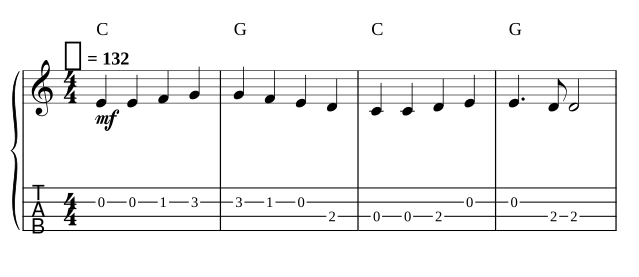
High-G MusicXML · Text TAB · Guitar Pro 5 · Listen to the source melody on guitar
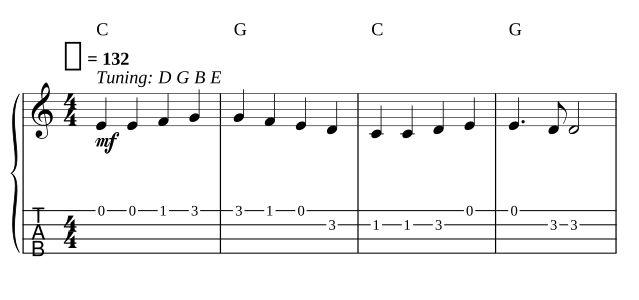
Baritone MusicXML · Baritone Guitar Pro 5 · Sources and conversion checks
Why the fourth string is not the lowest note
In high-G GCEA tuning, the fourth string sounds G4, above the third string’s C4. Reading four lines from bottom to top is therefore not the same as reading pitches from low to high. An open G can also be played at the third fret of the E string. Listen and choose the string that fits the phrase, rather than assuming the lowest fret is always the easiest move.
Soprano, concert and tenor ukuleles can use this same high-G tuning. Baritone DGBE is a separate preset. Low-G needs the lower G3 string entered explicitly; do not use high-G fret numbers on it and expect the same sound.
Fit the melody before choosing the fingering
High-G ukulele has no open string below C4. A low sung melody or a bass line can fall below that even when the notes were transcribed correctly. ScoreStarling marks notes no string can play. Move the melody up an octave or transpose it into a playable range, then listen again; do not quietly drop the low notes.
A wide piano chord may also ask for more simultaneous notes than four strings can play. Choose the melody or simplify the voicing before treating the TAB as a fingerstyle arrangement. The transposition tool helps put a part in another key.
A recording or a score file?
If you already have MusicXML or MIDI, open it instead of transcribing the recording again. For a phone recording of your own ukulele, keep the instrument clear and use One instrument or voice. For a full song, choose the melody part after a band transcription, or hum the tune into a separate recording.
One instrument or solo piano costs 10 credits a piece and covers 6 minutes (15 with Plus). A band costs 30 credits a minute, covering 6 minutes without Plus or 30 with Plus. Other features use the same monthly credits. See prices and downloads.
Before you play it
- Check the actual tuning and any capo first. One score keeps one tuning and capo setting per part.
- Read the staff or rhythmic TAB for note lengths. Plain text TAB alone is not a complete rhythm notation.
- Check the fingering by hand. This view does not add bends, slides, hammer-ons, pull-offs, chord diagrams or strumming directions.
- When using a Guitar Pro or MusicXML download, open it once and check the notes, strings and playback sound before rehearsal.
For six strings see audio to guitar TAB; for a bass line see bass TAB from audio. Our TAB reading guide explains lines, fret numbers and rhythm.
Questions and answers
Can this find ukulele chords for a song?
This page makes melody and fingerstyle TAB, not a chord chart. It does not draw chord boxes or strumming arrows. You still need to choose an accompaniment and check any chord symbols separately.
Does it support high-G and baritone ukulele?
Yes. Ukulele uses G4, C4, E4, A4, and Baritone ukulele uses D3, G3, B3, E4. Choose the tuning your instrument actually has before reading the fret numbers.
Can I use low-G tuning?
An assistant connected to ScoreStarling can set a custom tuning, including G3, C4, E4, A4. The named Ukulele preset is high-G. Check the open-string pitches in the result; changing the label alone does not change the tuning.
What is free?
Your own MusicXML, MIDI or ABC file opens free. A free account gets 100 credits a month, shared with its other uses. One instrument or solo piano uses 10 credits a piece; a band uses 30 credits a minute after you confirm the price. The first 30 seconds of a recording are free without an account. Every account can print a PDF with a small watermark and copy text TAB; editable downloads follow your account’s access.
Can I open the result in Guitar Pro?
ScoreStarling exports Guitar Pro 5 (.gp5), MusicXML and MIDI when your account has editable-download access through Plus or a purchased credit pack. Open the file in your notation app and check the tuning, notes and playback sound.
More tools
-
Audio to guitar tab
Turn a guitar, bass or ukulele recording into staff and TAB in your tuning and capo, with strings and frets you can change. The first 30 seconds are free.
-
Bass tab from audio
Turn a bass recording or a whole song into TAB for four-, five- or six-string bass. Check it against the recording and download it. The first 30 seconds are free.
-
MP3 to sheet music
Convert an MP3 to sheet music online. Choose what is playing, compare the score with your recording and print. First 30 seconds free.