
How to read guitar TAB
Start with the string, then the fret, then the rhythm. The same reading order works for bass and ukulele TAB.
The short answer
Each TAB line is a string, and each number tells you which fret to press on that string. Zero means an open string. Read from left to right; numbers directly above one another sound together. Check the tuning first, then read the rhythm from the staff or the TAB’s stems and beams. Uneven gaps in plain text TAB do not reliably tell you note lengths.
Which string does each line mean?
Standard guitar TAB has six lines. The top line is string 1, the high E; the bottom is string 6, the low E. The lines are not the five lines of a musical staff. From top to bottom the open-string names are E4, B3, G3, D3, A2 and E2.
A standard four-string bass has four lines: G2, D2, A1 and E1 from top to bottom. Ukulele TAB also has four lines, but a different tuning. In high-G ukulele the fourth string is higher in pitch than the third, so four lines alone do not tell you which instrument or tuning the TAB uses.
A fret number is not a finger number
A 3 on the top guitar line means the third fret of the high E string, which sounds G4 in standard tuning. It does not mean “use your third finger”. A 0 on that line means play the open high E string. A 12 means the twelfth fret, not fret 1 followed by fret 2.
Read the next number to the right as the next event. When several numbers share a vertical position on different strings, play them together as a chord or double stop. A capo and an alternative tuning change the relationship between the number and its sounding pitch, so read the tuning and capo instructions before starting.
Where do note lengths come from?
If TAB sits below a staff, use the staff’s note values, rests, ties and bar lines for rhythm. Rhythmic TAB can carry its own stems and beams. Plain text TAB often omits those details: the spacing may help you follow a recording, but it is not a dependable substitute for notation.
Two equal fret numbers can be two separate attacks or one held note tied across a bar. Listen and check the tie before plucking twice. A rest is silence, not an instruction to keep the previous note ringing indefinitely.
Quick check: does a larger fret number mean a longer note?
No. The number gives the fret position. The written rhythm or the recording tells you when the note begins and how long it lasts.
Read an exported bass part
This eight-bar excerpt is an existing bass transcription from Slakh2100 Track01881, exported as four-string TAB. It preserves the historical transcription’s notes and has not been corrected for this lesson. Use it to practise reading strings and frets, not as proof that every transcribed note is right.
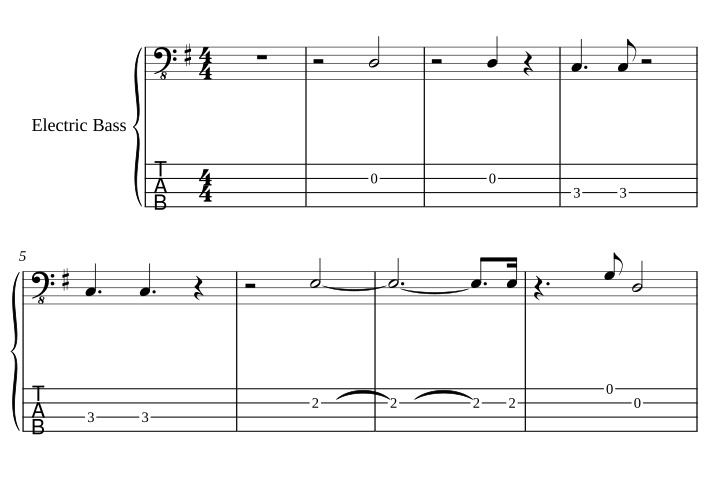
- Confirm that the tuning is four-string bass, E1, A1, D2, G2 from the lowest string upward.
- Choose one bar. Match each TAB number to its line before moving your hand.
- Count the staff’s rhythm and mark where the rests fall. Check any notes that sound together.
- Play the phrase slowly and compare it with the source. A readable TAB can still contain a transcription mistake.
Open the bass TAB PDF · Open its MusicXML · Source mix · Attribution and export checks
What do h, p, slides and bends mean?
| Mark | Usual meaning | What to listen for |
|---|---|---|
| h | Hammer-on | The second note starts with the fretting hand rather than another pick stroke |
| p | Pull-off | A lower note sounds as the higher fretted note is released |
| / or \ | Slide | The pitch travels between frets |
| b, or a curved arrow | Bend | The string is pushed to raise the pitch; read the target interval |
| x | Muted or dead note | A percussive attack rather than an ordinary pitched fret |
Different publishers use different symbols. These techniques are useful to recognize in other people’s TAB; ScoreStarling’s TAB view does not add bends, slides, hammer-ons or pull-offs automatically.
Check your reading before changing the fingering
First check the instrument, tuning, capo, string and fret. If those are right but the phrase feels awkward, the same pitch may be available on another string. Our string and fret guide explains that separate choice. To inspect the notes and hear a passage, open the score editor.
Show bars 1–4 as staff notation and TAB. Tell me the instrument, open-string pitches and capo setting. Explain the first bar’s strings, frets and rhythm before changing anything. If a note has another playable string, show the option while keeping the pitch and duration.
To make a part from a recording, see guitar TAB from audio, bass TAB from audio or ukulele melody TAB. A recording needs transcription first; a MusicXML or MIDI file can open directly. Return to practical guides for the next lesson.
Sources
- Fender: how to read guitar TAB, for strings, frets and common playing symbols.
- MuseScore Studio handbook: creating a tablature staff, for tuning and linked notation.
- The example’s dataset, license and conversion checks. The lesson does not rank transcription tools.