
From the recording to your bass
Hear the bass see the tab
Bring a bass recording or a song with a bass part. Get a score you can listen to, check against the recording and turn into TAB for your tuning.
Drop a bass recording or a song here
You choose one instrument or a band in the workspace before transcription starts. Preview 30 seconds first; a band’s price is shown before you confirm it.
Start with the bass part you need
A phone recording of your bass and a finished song need different transcription choices. For bass on its own, choose one instrument or voice. For bass under drums, vocals and other instruments, choose a band, then work on the bass part in the resulting score.
The goal is a part you can play. A detected note still needs the right octave, rhythm and a sensible place on the fingerboard. Keep the recording beside the score while you make those decisions.
From a recording to bass TAB
- Choose your audio or video file, then continue to the workspace. Nothing is transcribed just by selecting a file on this page.
- Choose one instrument for bass alone, or a band for a full mix. Check the preview and confirm the displayed price when required.
- Open the result and select the bass part. Set the tablature instrument and tuning that match your bass.
- Listen alongside the original, correct the notes and adjust strings or frets. Save the version you want to keep.
- Export the score or bass part in the format you need, and open it once before rehearsal.
A bass part from a historical band transcription
This is the first eight bars of the bass part from an uncorrected October 2, 2026 transcription of Slakh2100 Track01881, a synthesized multi-instrument recording. We extracted the bass part and used ScoreStarling to make four-string TAB. The notes were not corrected.
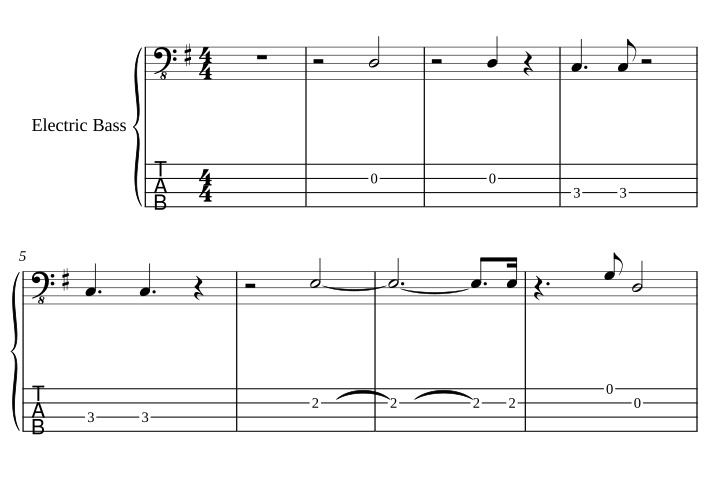
Download the source mix · PDF excerpt · MusicXML with TAB · Guitar Pro 5 excerpt
The TAB export keeps the excerpt’s sounding pitches. The GP5 file was checked by reading its notes and positions back; this was not a native Guitar Pro app test. The historical file’s playback instrument may need adjusting. Slakh2100 is CC BY 4.0; see the source, attribution and export details.
Check the octave before the fingering
Electric bass is commonly written an octave above its sounding pitch. TAB numbers describe physical strings and frets. Those two views can look different while representing the same sound.
For a standard four-string bass, the open strings sound E1, A1, D2 and G2, from lowest to highest. If a result puts the whole line an octave too high, correct the pitch rather than trying to solve every note with a new finger position. A low B requires a five- or six-string tuning with that string, or another tuning that actually reaches it.
ScoreStarling’s TAB assignment uses the score’s sounding pitch, including an instrument’s octave transposition where present. Still check the imported score and the export you'll use: a file with the wrong instrument or transposition can carry the wrong meaning into the next app.
Make the fingering fit your hands
The same note may fit several strings. Lower frets can be comfortable in one phrase, while staying in one position may work better in another. ScoreStarling offers low-fret and fewer-hand-shift choices, then lets you adjust individual notes.
Changing a note’s string keeps its pitch and changes its fret. Changing the fret changes the pitch that string plays. Listen after either edit, particularly around a shift or an open-string passage. Automatic transcription doesn't reliably decide the exact fingering the original player used.
Four strings, low B and alternate tunings
The bass presets cover four-string standard tuning, four-string Drop D, five strings with a low B and six strings with low B and high C. Choose the preset first, then review the line. Changing the tuning after manually assigning frets may change the fingering you intended.
A recording tuned below concert pitch can also confuse the first result. Check an open-string note against the recording. Do not assume every low note is an error, and do not move a whole part by an octave just to make a single note fit.
Listen where bass is hardest to hear
Start with a clear phrase, then compare a busier passage where the kick drum and bass overlap. Listen for notes that disappear, notes that last too long and a line that jumps to a higher octave. A distorted tone or a strong harmonic can make the apparent pitch misleading.
Correct a short section before working through the whole song. You can also ask Starling for a specific change, such as moving a passage down an octave or simplifying a rhythm, then inspect and listen to the result. Keep a saved version before making a larger change.
Take the part to rehearsal or your editor
Print a PDF when you need a reading copy, use text TAB for a quick reference, or export Guitar Pro 5 when you want to continue editing strings and frets in a compatible application. MusicXML is useful for notation work; MIDI is useful for playback and production. The editable formats require Plus or a purchased credit pack.
Check the file once in the app you plan to use. A supported export format doesn't guarantee identical sound or layout. Bends, slides and hammer-ons are not automatically written by this TAB workflow; add the technique markings you need.
Check the price for your recording
One instrument or voice costs 10 credits per piece, up to 6 minutes. Band transcription costs 30 credits per minute, up to 30 minutes, and requires confirmation of the displayed price. Every piece has a 30-second preview. Free accounts receive 100 credits each month.
Questions and answers
Can I get bass TAB from a full song?
Choose the band workflow for a recording with several instruments. Once the result is ready, select the bass part and set its tablature instrument and tuning. Dense mixes can produce missed notes, extra notes or octave mistakes, so listen before treating the TAB as ready to play.
What if my recording contains only bass?
Use one instrument or voice for an isolated bass recording. It costs 10 credits per piece up to 6 minutes, after a free 30-second preview. A full band uses a different workflow and costs 30 credits per minute after price confirmation.
Does it support five-string bass and low B?
The bass presets include four-string E–A–D–G, Drop D, five-string B–E–A–D–G and six-string B–E–A–D–G–C. Choose the tuning that matches your instrument before checking the fingering. A pitch below the lowest string can't be fixed by assigning it to another fret.
Can I export the bass part for Guitar Pro?
Guitar Pro 5 (.gp5), MIDI and MusicXML exports are available with Plus or a purchased credit pack. PDF and text TAB are also available for the score. Check the exported file in your own editor; exchange formats may not reproduce every layout or playback detail.
Can I start with a YouTube link?
Yes. Open the workspace and paste a public recording link that you have permission to use. Choose the band workflow if the bass is mixed with other instruments. See the YouTube TAB guide for the link handoff.
Is bass TAB generation free?
Each piece starts with a free 30-second preview, and free accounts receive 100 credits each month. A preview doesn't include a downloadable full result. Check pricing for transcription and editable-download access.