
Agent TranscriptionBeta
Your recording,written as a score
Starling listens, looks the piece up and checks its work
Add a recording or video link. Get sheet music to play, edit and download.
Preview the opening free · The whole piece from 150 credits
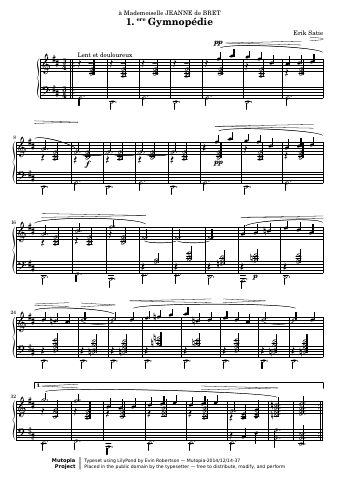 Published piano scoremutopiaproject.org
Pedal changes aren’t marked

A first draft from the recordingA published score to check againstThe music, written bar by barCheck the notes. Mark the doubtsA score to play, edit and download
Recorded example, shortened for this demonstration
Hear the difference
One recording. Two scores
Play the recording, the quick draft and Starling’s version. Follow the same bars and hear what changed.
The interactive example couldn’t load. You can still read the score and see the full run below.
- Sources read
- 3
- Drafts checked
- 4
- Notes rewritten
- 28
- Minutes in this run
- 6
In this example, the pitches were already right. Starling changed note lengths and which hand plays them. One run is an example, not an accuracy guarantee.
Read one run, step by stepThe work behind the score
The sources it read and the drafts it checked, replayed from this run
The interactive example couldn’t load.
- 1
Listen
It listens to your recording and makes a first draft to check
- 2
Look it up
It reads your video’s page, then looks up the original, published scores and arrangements, and what their makers said
- 3
Write
It writes the whole piece out against the recording, bar by bar
- 4
Proofread
It reads over each draft, fixes what’s wrong and notes what it isn’t sure of
Price
You pay only for a whole piece you have already seen the opening of
The whole piece
150 credits
About US$3.75 at top-up prices
- Opening
- Free preview
- Recording length
- Up to 2 minutes of music, then 25 credits a minute, up to 6 minutes
- You get
- An editable score, every download format, no watermark
Its method is public
Agent Transcription follows the transcription skills of ScoreStarling’s public plugin: how to research a piece, write it out against the recording and proofread it. Anyone can read them.
Questions
What is Agent Transcription?
ScoreStarling’s way of turning a recording into sheet music with Starling, its AI, working as an agent. Like a musician transcribing by ear, it listens, looks the piece up, writes it out against the recording and proofreads it.
How long does it take?
Usually 10 to 20 minutes. You can close the page: it keeps working and emails you when the score is ready.
How much does it cost?
The opening is free to preview. The whole piece is 150 credits for up to 2 minutes of music, then 25 credits a minute, up to 6 minutes. You decide after you have seen the opening.
What music works best?
Solo piano works best. Recordings of one instrument or one voice work too. Full bands aren’t supported yet.
What if it finds the original score?
If it finds the score of the version your recording plays, it follows that score and uses your recording to line it up. It reads only what is openly available.
Do I need an account?
Yes, a free one. Add your recording, set it up and press Create score. We ask you to sign up then, and once you have, Starling starts on that recording, with nothing to add again.
Is it always right?
Not always. It checks its own work and tells you what it isn’t sure of. You can change any note in the editor, or ask Starling to.
Can I use a video link?
Yes. Paste a link from YouTube, Bilibili and other video sites. For a video, it also reads the video’s page.
Try it on your recording
Preview the opening free · The whole piece from 150 credits